Loading lesson…

Loading lesson…
Complete Your First AI-Native Mini Games
In this section, you've followed the steps to experience the complete process from "conversational Snake generation" to "understanding AI-native game design thinking." The following assignments will help you turn this understanding into real skills.
That's the complete tutorial! You may need about 4 hours to finish all the content and build your own Snake game. Don't rush—explore, experiment, and enjoy the process. If you encounter concepts you don't quite understand along the way, we recommend checking the relevant sections in the appendix below.
💡 One-line Summary
You don't need to write code, but understanding the basic concepts helps you describe requirements to AI more effectively.
Think of a webpage as a house. Three types of "code" each handle one thing:
The browser builds the frame with HTML, decorates with CSS, and switches on the power with JavaScript — three steps, and there's your webpage.
They're "prefab tools" for building complex pages — faster and more reliable. You don't need to learn them; just know they're helpers.
No code writing, just describing. Talk to AI in plain language, for example:
"Use React to make a leaderboard page, with a score list on the right. Clicking a row shows player details below. Clean, modern style."
To learn more, check out the Web Basics Appendix and the Frontend Evolution Appendix.
💡 What is Vibe Coding? Computer scientist Andrej Karpathy (one of the co-founders of OpenAI, former head of AI at Tesla) coined the term vibe coding in February 2025. This concept refers to a coding methodology that relies on LLMs, allowing programmers to generate working code by providing natural language descriptions instead of manually writing code.
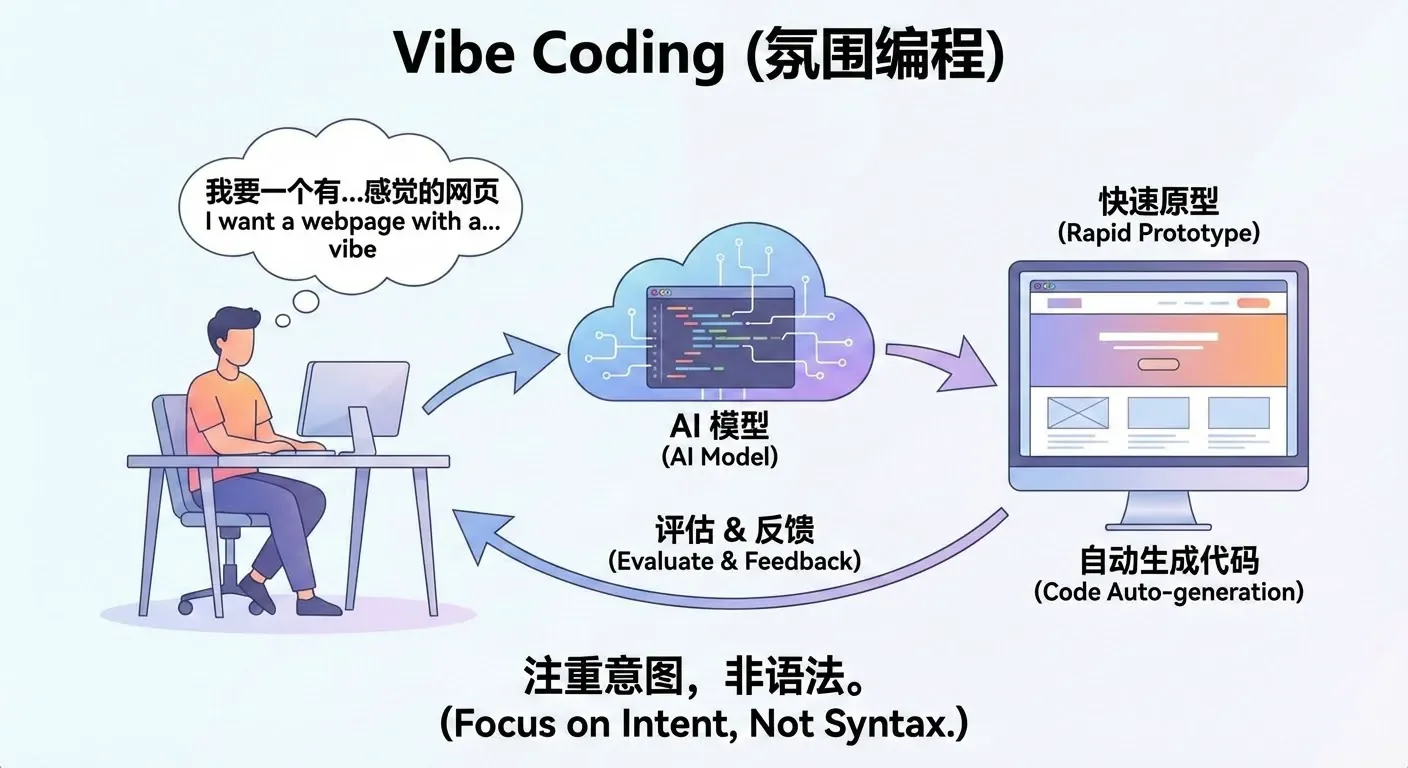
Literally, Vibe Coding can be understood as a way of "developing by talking." The core change is: you no longer need to write code line by line, look up syntax, or debug yourself. Instead, you directly describe what you want in natural language, for example:
"I need a login page with a phone number input field and a verification code input field." "After successful login, redirect to the homepage and display the username in the top right corner." "Give me a simple Snake game that can be controlled with keyboard arrow keys."
The Large Language Model (LLM) will automatically translate these descriptions into real, runnable code and generate the corresponding pages, logic, and data structures. After you see the results, you can propose modifications in natural language, such as "make the button bigger," "change the background to dark," "record scores and display a leaderboard," and the AI will continue adjusting the implementation according to your requirements.
In this mode, you don't need to learn a programming language first before writing code. Instead, you focus your main energy on: clearly stating what you want to do, judging "what's wrong" after seeing the results, and then proposing new modifications. AI handles turning these high-level ideas into concrete implementations, significantly reducing mechanical, repetitive coding work.
You can click here to learn more about vibe coding: https://www.ibm.com/think/topics/vibe-coding
You can click here to see more of Karpathy's shared content: https://karpathy.bearblog.dev/blog/
In practice, during real vibe coding, we usually don't use many complex prompts. Perhaps we need a specific and moderately complex prompt for the entire program at the beginning, but after that, at each step, you may only need prompts like these:
"There's a bug in the code, please fix it."
"I don't want partial code, give me the complete modified code."
"Your code still has problems."
"Please modify again and give me the complete corrected code."
"It was working before, why isn't it working now?"
"Did you not understand what I meant? Don't change my original code."
"Don't add any debugging features."
"Don't do things I didn't ask you to do."
"Where is the feature I asked you to implement?"
"Can you not understand what I'm saying?"
"I only want one function."
"I told you to refer to my previous code."
"Please don't add unnecessary comments."
"Please don't modify the basic logic of my original code."
"Help me modify the code."
"Modify based on my code..."
"Don't change my variable names!!!"
"Don't change the original function names!"
"Don't mess with my variables."
"Don't add extra features."
"Don't just generate a skeleton, generate the complete code."
This may sound a bit exaggerated, but in reality, these are the prompts we might use in daily work. Due to the context length limitations of large language models, or sometimes because their instruction following ability isn't very strong, models may forget content discussed earlier in the conversation. In vibe coding, we tend to use models with long context and strong instruction following ability. We can judge whether a model is good through rankings or metrics of these two aspects.
Alternatively, due to the style of training datasets, large models tend to respond in the style of their training data. For example, some speak very seriously, some like to add lots of embellishments, and some models like to add lots of comments or unnecessary modules to code.
Model context can be understood as AI's short-term memory. It refers to all the text content that the model can "see" and "remember" during a single conversation or task, including your previous questions, system-provided instructions, relevant materials, etc.
It is precisely because of context that AI can understand you're continuing from previous content, enabling round after round of coherent, natural conversation. Without context, every sentence you say would appear to the model as a completely new question—it wouldn't know what you said before, and there would be no way to continue a conversation.
Each model has its own effective context length (context window). This length is usually measured in tokens (which can be roughly understood as units of "word fragments"), and most mainstream models currently range from 32k to 128k tokens. The longer the context, the more content the model can "read" at once, for example:
When your input approaches or exceeds the model's context limit, some common phenomena often appear:
These phenomena don't mean the model suddenly "got dumber"—they are natural results of the context capacity being used up or nearly used up.
In practical use, we want the context to be as long as possible, while also being aware that:
Therefore, when designing AI applications, you need to balance letting the model see enough information with controlling costs and improving efficiency. For example:
Instruction following refers to: after the model understands your instructions, whether it can accurately and completely execute according to your requirements. This includes not only answering questions, but also completing tasks in specified formats, styles, and steps.
For example, the following are all instructions with clear requirements for the model:
A model with strong instruction following ability typically has these characteristics:
In practical applications, strong instruction following ability is very important for these reasons:
Therefore, when selecting and evaluating a large language model, in addition to focusing on whether it's smart and has broad knowledge coverage, you also need to pay special attention to its instruction following ability. For industrial-grade applications, being able to stably and accurately execute instructions is often more important than occasionally giving a stunning answer.